91%1
of businesses use video as a marketing tool.
Interactive video marketing software
Blue Flame helps you host videos, turn views into leads, sell inside videos, guide every viewer, test what converts, know what works and build branded Video Hubs.
Discover what your audience wants, create and publish faster, deliver videos across websites, share pages, TV-style hubs and compatible media apps, then add the calls to action, journeys and analytics that turn passive viewing into measurable opportunities.
Hosting, interactive video, lead capture, analytics, campaign tools, recording, SEO and branded Video Hubs in one connected platform and so much more!
Get My First Year of Blue Flame Core for $37
Get $1,676 in video marketing capability for $37 in your first year.
First 12 months of Core plus 5 GB managed hosting. Planned renewal after year one: $97/year.
Hosting, importing, interactive players, campaigns, analytics, recording, SEO, collaboration and more—organised so you can find what matters without reading another enormous feature list.
FROM IDEA TO OPPORTUNITY
Blue Flame brings the complete video workflow together: discover what to create, produce it faster, publish it across your world, improve its discoverability and give every viewer a clear next step.
Step 1
Discover relevant video angles and find external sources for reusable footage and music.
Step 2
Turn the idea into a script, use the Teleprompter, record from your phone or capture directly from the browser extension.
Step 3
Import or upload the finished video, organise it in Blue Flame and publish it using the managed capacity included with your first year.
Step 4
Use SEO Studio, subtitles, chapters and branded TV-style Video Hubs to make videos easier to understand, explore and discover.
Step 5
Capture leads, reveal offers, book calls, promote your own or affiliate products and run your own video adverts.
Step 6
See watch behaviour, drop-off, clicks and leads, then test complete videos and new openings to find what performs better.
Start with an idea. Finish with a published video that can attract attention, capture a lead, win a click, book an appointment or promote an offer.
Without Blue Flame
With Blue Flame
5 GB of managed hosting included for your first 12 months. Built-in tools that support organic discoverability.
Show me an example
Pick a type of business to see one possible path through the loop.
Possible workflows, not guaranteed outcomes.
The opportunity is already there
91%1
of businesses use video as a marketing tool.
85%1
of video marketers say video has helped them generate leads.
83%1
of video marketers say video has directly increased sales.
85%1
of people have been convinced to buy something by watching a video.
65%3
of viewers stay to the end of videos under one minute, compared with 20% for videos over 20 minutes.
Nearly 25%2
of viewers completed an on-video lead form in a 2025 industry analysis.
Industry findings, not promised Blue Flame results.
Create once. Use it everywhere.
Upload once. Share it, embed it, drop it in a course or web app, or stream it to a compatible TV app. No extra copies.
 One video
One Blue Flame video → many places → one connected experience → one dashboard
Copied embeds play in the fast hosted player. Calls to action, lead forms, journeys and your own ad breaks come alive on your Blue Flame share and watch pages.
Keep one organised video instead of uploading another disconnected copy for every campaign.
Your share link opens the Blue Flame Marketing Player with your logo, calls to action and lead forms.
Use your video on the blog, sales page, course, member area or share link that already fits the campaign.
Embed code points at one permanent Blue Flame address, so your pages keep playing without re-pasting code.
Views, watch time, clicks and leads from your share links report into one Blue Flame dashboard.
Imagine this
Using several Blue Flame videos on one page? When the viewer starts another, the previous video pauses automatically, so lessons, comparison pages and video libraries never become a wall of competing sound.
Your audience chooses where to watch. Blue Flame keeps the experience connected.
The problemWhy most video goes nowhere
Four leaks quietly drain the value of every video you make. Blue Flame closes them in one place.
The problem
Viewers watch, then leave with no next step.
Blue Flame
Adds a lead form, offer or booking button inside the video.
Attention becomes action.
The problem
Hosting costs rise or stay unclear as you grow.
Blue Flame
Shows your allowance and usage, with no automatic overage bill.
Grow without bill anxiety.
The problem
A stack of tools: a video host, a separate opt-in page, a form builder and more.
Blue Flame
Hosting, player, capture, testing and reports together.
One login, one library.
The problem
You cannot prove what a video achieved.
Blue Flame
Tracks watch time, clicks, leads and drop-off per video.
Proof you can act on.
The problem
Passive views, one-way video.
Blue Flame
Upload or import → Add the right action → Publish in your own player → Capture the response → Measure behaviour → Improve the next version
Every video gets a job.
The problem
Guessing which version works.
Blue Flame
Split tests and SEO tools on every video.
Improve with each upload.
The cost of video should not punish growth
You built the library. You earned the viewers. Then growth changed the bill.
More videos, more embeds, more viewers. Suddenly storage, bandwidth and plan rules matter, and success feels like exposure instead of momentum.


Your original plan no longer feels like the plan you bought.
Storage and delivery rules become important only after your library depends on them.
Hundreds or thousands of videos make switching feel impossible.
More viewers should mean opportunity, not anxiety about the next invoice.
Why we built Blue Flame
Blue Flame was built so growth could feel exciting again.
We kept seeing the same story. Creators built valuable video libraries, attracted more viewers, and then found the simple plan they started with no longer felt simple. Limits, plan changes and rising costs appeared after the hard work was already done.
So we built the video platform we wanted to use ourselves: our own application, managed-hosting layer, usage controls and marketing tools in one place to bring your videos, turn them into campaigns, understand what they are doing and choose how they are hosted.
Your video library should be an asset you control, not a cost mystery you are afraid to grow.
The Blue Flame transformation
Blue Flame adds a measurable action layer to videos that would otherwise end with the viewer simply leaving.


A viewer presses play on your video.
A prompt, question or choice appears at the right moment.
They leave an email, book, or click through to the offer.
You see what happened and improve the next version.
Example: a video doing its job
Blue Flame Media playerVideo playingWant my #1 pick for clearer audio?
Short walkthroughs from inside Blue Flame. Pick one to watch.
Interactive marketing player
Your product video shows the offer at the moment the product looks its best, and the viewer can buy without hunting for a link.
Blue Flame Media · Marketing Player
The Cobalt Edition is back in stock
Launch colour, while this video plays
The product video plays. Watch the offer appear.
Blue Flame Media · Player settingsExample figures from this demonstration only.
Your video. Your ad break.
Choose the advert, decide when it appears and control when viewers may skip. Send interested viewers to your offer, measure the response and keep the experience inside your own Blue Flame player.
Automatic Playback Control
Blue Flame prevents competing audio automatically. The moment a viewer starts another Blue Flame video, the previous one pauses and remembers its place. No setup, no confusing controls and no page full of overlapping sound.
Video 1 is playing. The others paused and kept their place.
Silent demonstration. Tap any video to start it.
Lead capture inside videos
The video pauses at the moment interest peaks and asks for an email with a reason to give it.
Blue Flame Media · Lead capture
The video plays. In a moment it pauses for an email form.
Blue Flame Media · Lead capture settingsTimed calls to action, offers and bookings
When the explanation lands, the button appears. The video keeps playing, so nobody is interrupted and nobody has to go looking for your calendar link.
Blue Flame Media · Timed call to action
Want help applying this to your business?
Book your strategy callThe prompt is set to appear at the marker on the timeline.
Surveys, chapters and Video Journeys
Viewers pick what matters to them and go straight to the most relevant next video.
Blue Flame Media · Video Journey
Blue Flame Media · Video JourneysBlue Flame Media · ChaptersPause the video to ask one question. Every answer is counted in your analytics, so you learn what your audience wants in their own words.
Included bonus · Campaign Wizard
Pick a goal and the wizard switches on the right tools, then walks you to a preview and a published link.
Blue Flame Media · Campaign Wizard
Goal: Capture leads
Step 1 of 7: Goal
Adds an email form at the moment you choose, then measures how many viewers join.
Blue Flame Media · Campaign WizardImporting
A big library should never be the reason you feel stuck. Your best videos already exist, so bring them into one library and give them a job, instead of re-recording or starting from zero somewhere new.
Bringing a large library? Blue Flame checks the space first, maps out what you need and avoids leaving half your collection behind.
Drag in the video files you already have.
Paste a list of supported video links, or the CSV export from your old platform.
Point Blue Flame at a page on your site and bring in the videos found there.
Bring across an existing video library in organised batches instead of moving one video at a time.
Hosting, privacy and organisation
Your first year includes 5 GB of managed hosting, folders, search and private watch links, with clear usage visible inside your account.
Blue Flame Media · My VideosBuilt for reliable playback
Your viewer presses play. Blue Flame handles the complicated part.
Videos travel through a global content network instead of one distant server.
Each viewer watches at a quality their screen and connection can comfortably handle.
A dropped connection does not mean starting a huge upload again.
Time-limited streaming addresses help protect how your videos are delivered.
Use the web player, an MP4 or the dedicated stream in compatible viewing apps.
See the exact storage your library uses, so there are no surprises.
All of this comes with Blue Flame Core, including 5 GB of managed hosting for your first 12 months.
Know what you have
Grow with your eyes open. Your first 12 months include 5 GB of managed stored-video capacity, and you can see exactly how much of it you are using.

See your allowance.
See what you are using.
Choose when to add more.
No automatic hosting-overage charge.
Your videos are not deleted because an estimate rises.
Traditional hosting anxiety
The Blue Flame approach
Replace uncertainty with visibility. Keep the next step in your hands.
How usage works
Decide with your team
Watch time, clicks, leads and drop-off for every video, in one place your whole team can read.

Analytics and viewer behaviour
One dashboard shows how many people watched, interacted, clicked and became leads, for every video.
Blue Flame Media · Viewer journey
Fictional example figures. Your dashboard shows your own videos' real numbers.
Blue Flame Media · Marketing AnalyticsWhole-video split testing
Put two to four finished videos behind one link and see which one earns more attention and clicks. Or take one main video, attach different opening clips and build the next test without another full edit.
Blue Flame Media · Whole-video split test
Same offer: one microphone recommendation
What changed: the whole opening, setting and framing
Why test it: find which start makes more viewers click
 A
AVersion A: opens with a story
Evening living room, hoodie, relaxed wide shot. Spends the first minute on why he switched microphones.
2.1% clicked the offer (example)
 B Example winner
Version B: opens with the verdict
Bright studio, shirt, close-up to camera. Names the winning mic in the first ten seconds.
3.4% clicked the offer (example)
Fictional example, not customer results. One link splits viewers between both complete videos, sends everyone to the same offer, and Blue Flame reports which version performs better.
Blue Flame Media · Split test builderContent Finder
Describe your business and get fresh angles to film, plus sources for reusable footage, photos and music. Send the idea straight to your teleprompter.
Blue Flame Media · Content FinderExternal footage and music may have their own licence terms. Always check the source before using an asset.
Video SEO Studio
Stronger titles, descriptions, key phrases, structured video information and a video sitemap, with a readiness checklist so nothing is missed.
SEO tools support discoverability but cannot guarantee rankings or traffic.
Teleprompter, browser recording, subtitles and transcripts
Write at your desk, scan the QR code, and your phone becomes the camera and teleprompter. Keep the take and turn the script into subtitles for viewers in ten languages, without moving files around by hand.

Teleprompter Demonstration, no camera
Hi, I'm glad you're here.
In the next two minutes
I'll show you the one change
that makes your videos
ask for the next step.
Let's get started.
Hi, I'm glad you're here.
In the next two minutes
I'll show you the one change
that makes your videos
ask for the next step.
Let's get started.
Blue Flame Media · Teleprompter studioBlue Flame Media · SubtitlesIncluded bonus · Browser extension
Record your screen and camera from the toolbar, and the finished video is waiting in Blue Flame with a link ready to copy.
Blue Flame Media · Browser extension
Recording 0:42
Screen and camera
Stop and saveScreen and camera, straight from the tab you are on.
Shared workspaces
Invite your team into a shared workspace with one library, one set of campaigns and one set of numbers.
Blue Flame Media · WorkspacesEasy to learn. Harder to get into.
Blue Flame does not hand you a crowded dashboard and wish you luck. Guided tours walk through the real screen you are using, while optional two-factor sign-in adds a second lock to the account holding your video library.
Start a short tour from the screen you are on. It points to the real buttons in the right order, so your first campaign feels like progress rather than homework.
Protect sign-in with your authenticator app and keep one-use backup codes for the day your phone chooses drama. Optional to switch on, reassuring once it is.
Front End launch bonus
BONUS: TV-Style Video Hub Builder
Your brand. Your colours. Your videos. One polished destination your audience will actually want to explore.
Turn your Blue Flame library into a polished, binge-worthy video destination with your own logo, colours and carefully selected videos. It is hosted on Blue Flame, uses videos already in your library and needs no extra website builder.
Like the big streaming sites, every video shows a small preview picture as viewers hover or drag along the progress bar, so they can jump straight to the part they want.

A working Video Hub
Select a programme to feature it.

Featured this week
Maya shows you how to turn a simple room into a confident, recognisable place to record.
Play episode 12 minFictional programmes and people, shown inside the real Video Hub layout.
A branded home for your videos makes a small brand feel like a serious one from the first visit.
Pick the videos, choose the featured one and set the order. Everything else lines up beautifully.
A featured video, a watch-next collection and search invite people to press play again.
Swap a pile of scattered links for one address you can put in every bio, email and post.
What it could look like for you
Examples of what is possible, not claimed results.

Know which video sells before you spend more on traffic.
Split test two openings and put your budget behind the version with more clicks.

Let the demo video sell the product while it plays.
Show a Shop now card at the moment the product looks its best.

Turn a useful video into a booking opportunity.
Show a booking button once you have made your case and ask one qualifying question.

Let the video on your website collect the enquiry.
Embed a Blue Flame player with a simple offer or contact prompt.

Decide together from the same numbers.
Share one workspace, one library and one set of results.

Put the offer, or the next lesson, at the moment of interest.
Add a timed link to the product you review, or guide students to the right lesson or offer.
Interactive demonstration
Pick an experience, press play and see a passive video become a prompt, a choice or a measurable next step. It all stays in your browser and saves nothing.
Blue Flame Media playerFictional sample videoA booking button appears once interest is built. Press play to try it. The sample videos are fictional and nothing you enter is saved.
Built to be easy
You never have to guess what to do next. Help is built into every screen, so you can go from first upload to a working campaign without watching hours of training.
A wizard that sets campaigns up for you
Pick a goal, pick a video, and it walks you through seven short steps, with a plain hint on each. Then it points you to your next win: a Video Hub, your own advert or a split test.
Guided tours of the real screens
A two-minute quick tour, or a full tour in short chapters. It highlights the real buttons, not pictures of them.
A How-to button on every screen
Press it and you get the guide for the screen you're on: short, numbered steps, searchable, with a Show me button.
Little ? marks where you'd hesitate
Next to the headings that matter, one tap explains that thing in plain English, without leaving the page.
Campaign wizard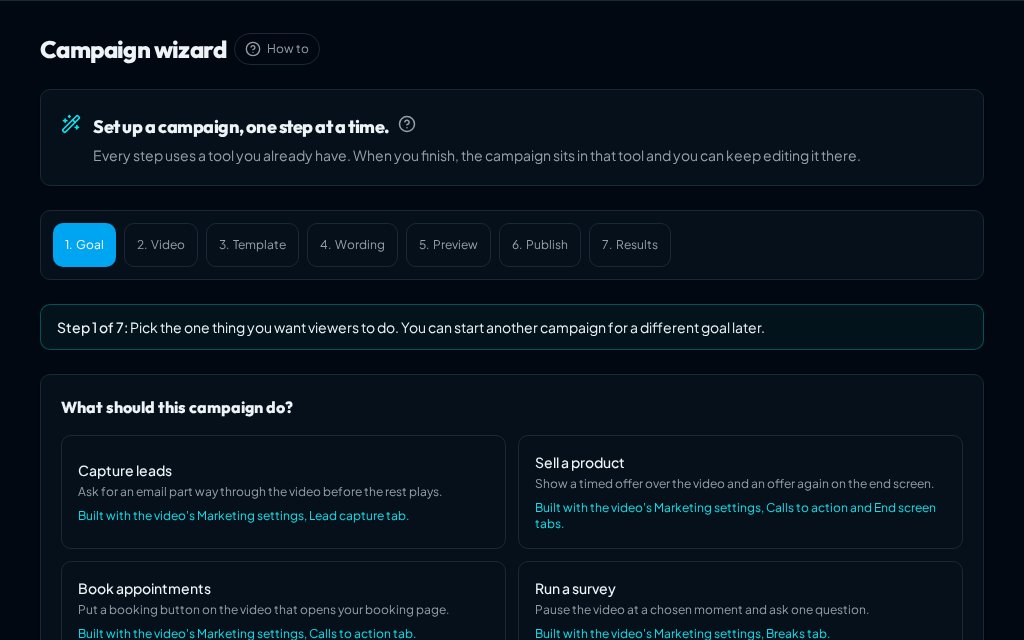
ValueWhat is included
$1,639 below the assigned value
Assigned value is a conservative value we give the included modules. It is not a previous or usual price, and no customer has paid it.
Blue Flame Media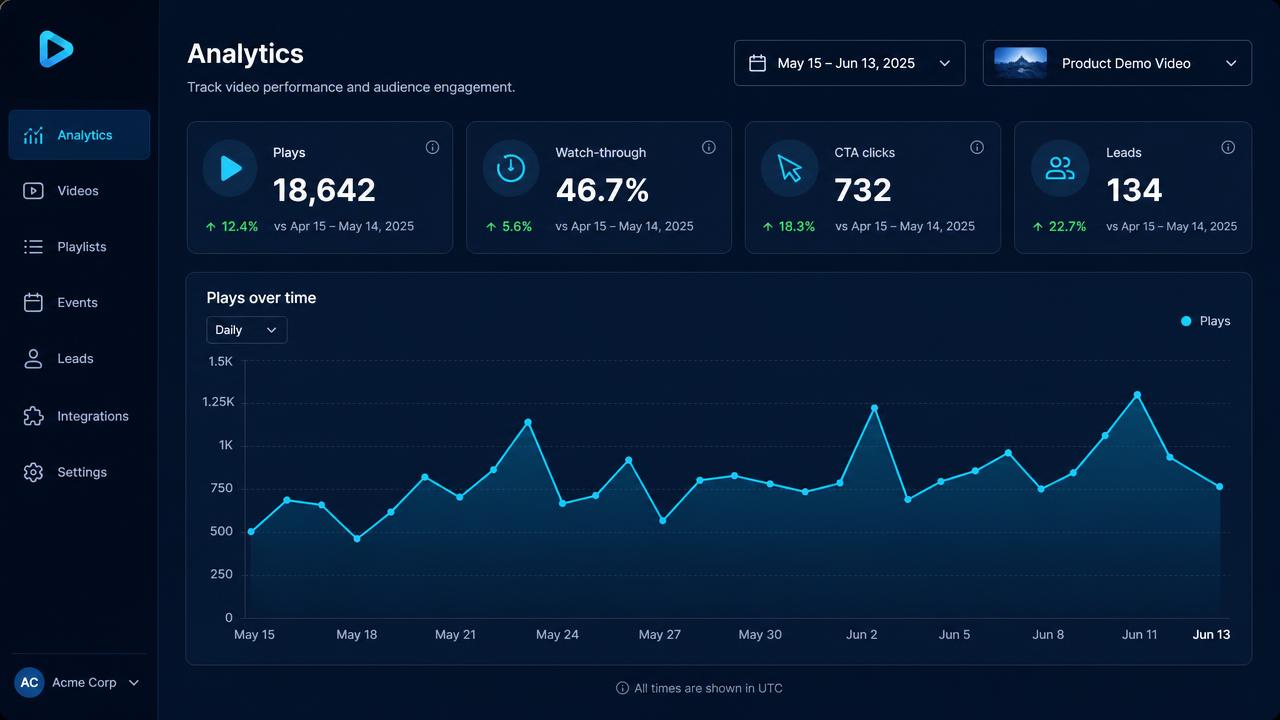
Pricing pages checked 25 September 2026. These are not like-for-like comparisons, and Blue Flame is not the same as any named service.
Everything you need to turn passive plays into measurable action.
Blue Flame launch access
Starts the full Core platform, 5 GB managed hosting and both launch bonuses. Planned renewal after your first year: $97 per year.
Introductory launch price for your first year.
See everything includedBlue Flame Media
The interactive video marketing platform, with hosting, for your first 12 months.
5 GB managed hosting for 12 calendar monthsUpload or import the videos you already have.
BONUS: TV-Style Video Hub Builder
Turn selected videos into a page that feels unmistakably yours.
Included at no additional charge
Campaign Wizard
Your first measurable campaign, live on day one.
Included at no additional charge
Blue Flame browser extension
Record, save and share a video without leaving your browser.
Included at no additional charge
Your first 12 months
$37
Planned renewal after your first year: $97 per year
30-Day Blue Flame Fit Guarantee
If Core does not fit, contact us through the Contact page within 30 days of your Front End purchase for a refund of the Front End price. A Front End refund removes only the Front End access and its 5 GB hosting allowance. You then get 30 days to download your videos - nothing is deleted silently. Refunding an upgrade removes only that upgrade; every other purchase stays in place.
RecapEverything in Blue Flame Core
Blue Flame Media Core
Total assigned value $1,676. Launch price $37 for the first 12 months. $37 for your first 12 months of Core with 5 GB managed hosting. Planned renewal $97/year. 30-day guarantee.
Already a member? Log in
The video marketing platform shown on this page: hosting, an interactive player, lead capture, calls to action, Video Journeys, analytics, split testing, publishing tools and the included creation tools.
Your first 12 months of Core access, plus 5 GB of managed hosting for the same 12 calendar months.
After the first 12 months, Core renews at $97 per year - but only if you clearly agreed to yearly billing at checkout. We send reminders 14 days and 3 days before any renewal. If a renewal fails or you cancel, you get a 7-day grace period. After that, new uploads and paid Core creation and marketing tools pause. Your existing videos, share links and embeds keep working, and you can still sign in, manage your library and download or export everything. Renew at any time and the paused tools come back straight away.
30-Day Blue Flame Fit Guarantee: if Core does not fit, contact us through the Contact page within 30 days of your Front End purchase for a refund of the Front End price. A Front End refund removes only the Front End access and its 5 GB hosting allowance. You then get 30 days to download your videos - nothing is deleted silently. Refunding an upgrade removes only that upgrade; every other purchase stays in place.
5 GB of Blue Flame managed hosting for your first 12 calendar months. Delivery is fair-use, with no automatic hosting overage charge.
Yes. Your account shows its managed storage allowance and current usage, with no automatic hosting-overage charge.
Yes. Private libraries, controlled watch links and protected playback are built in.
Yes. Upload files, paste a list of supported video links or a CSV export, or bring in videos from a page on your website.
It brings in the supported links, files and pages you choose. Some platforms or private videos may need you to download and upload them yourself.
It searches freely licensed clips, photos and music you can bring into your library, and suggests video ideas you can send to the teleprompter.
Yes. Choose when the email form appears, write the heading and button, and keep the viewer inside the video.
Yes. Timed calls to action open your chosen offer, booking page or next step while the video plays.
Connected videos with clickable choices, so each viewer continues to the most relevant next scene.
One link shares viewers between complete video versions, and the results show which one earns more attention and clicks.
No tool can. It gives search engines clear titles, descriptions and video information so your videos are easier to find.
Automatic subtitles are credit-based and only start when you approve them. Uploading your own SRT or VTT file uses no credits.
No. The Campaign Wizard guides you from a goal to a published campaign in seven steps.
Yes, anywhere that accepts standard video embed code.
Calls to action, lead forms and Video Journeys run in the Blue Flame Marketing Player on your share link. Embed code plays the video cleanly inside any page that accepts it.
Watch pages and embeds work in modern phone browsers. Blue Flame is a web platform, not a separate phone app.
You can customise the player and add your own logo. Complete white-label removal is not part of this offer.
Use the Log in button at the top of this page with the email you bought with.
Step-by-step tours meet you inside the app, searchable help is built in, and you can reach us through the Contact page.
Yes. Shared workspaces give invited people one library, one set of campaigns and one set of results, with an activity history showing what changed.
Yes. Add an authenticator app and keep a set of one-use backup codes somewhere safe.
Results are not typical or guaranteed. Any figures, examples or outcomes shown on this page are illustrations of what the software can do, not promises of leads, sales or income. Your results depend on your videos, audience, offer and effort.
The launch price covers your first 12 months of Blue Flame Media Core with 5 GB of managed video storage. When that storage is full, new uploads pause until you remove videos or buy more room; videos already uploaded keep playing. Nothing is charged automatically for extra storage. Video delivery is subject to fair use, and we may contact you or limit delivery if an account's viewing traffic is far beyond normal use. The planned renewal after year one is $97/year.
The "total assigned value" is our own estimate of what the included features would cost separately; it is not a price anyone has paid. If your plan ends, we keep your videos for a reasonable period so you can renew or download them, after which they may be removed. Payments are processed securely; see our terms and privacy pages for full details, or use the Contact page with any questions.